Does Navi+ slow down my store?
Short answer: no. Here’s how it loads, and what to check if your score moved.
How Navi+ loads
The app embed adds one starter script of about 18 KB, marked async — the browser keeps building your page while it downloads, so it never blocks your content.
That script then pulls the menu engine, its styles and your menu data from the Navi+ CDN. Menu content loads when a menu is opened, not on page load: a drawer full of images costs nothing until a shopper taps it.
Nothing is stored in your theme, so nothing is added to your theme’s own JavaScript or CSS bundles.
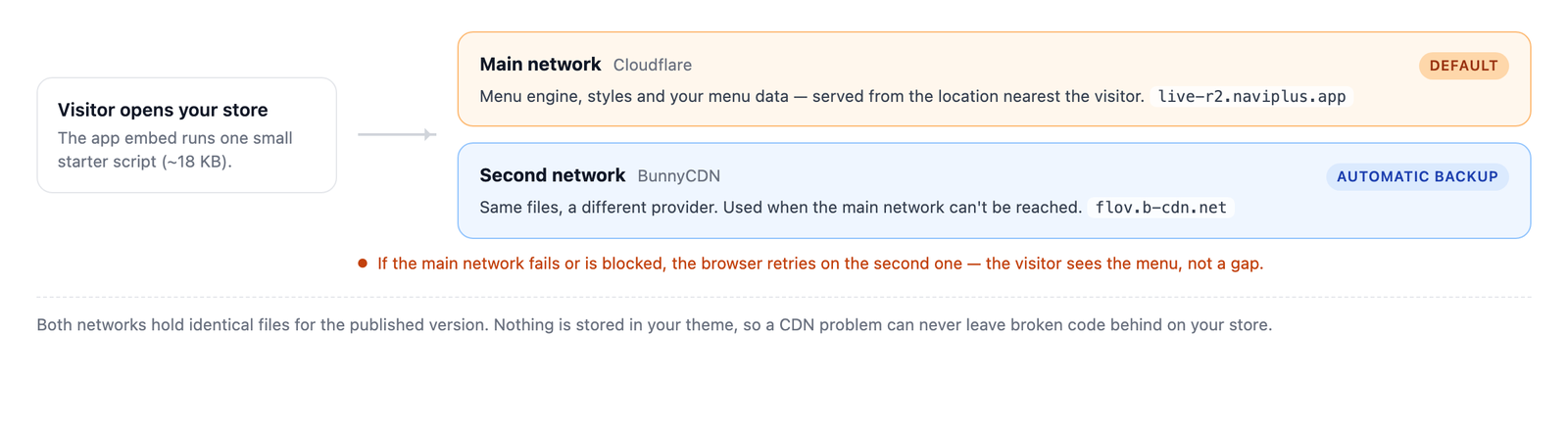
If your PageSpeed score dropped
A score moves for many reasons, and single runs vary a lot on the same page. Before blaming any app:
- Run the test 3 times and compare the median, not one result.
- Test the same page and the same device type each time — a product page and the home page aren’t comparable.
- Check what else changed — a new app, a theme update, or a big hero image affect the score far more than a menu.
To measure Navi+ specifically: run the test, then turn the Store Connector app embed off on a duplicate theme, run it again on that copy, and compare. That’s the only clean comparison.
Things that genuinely cost time
- Large images in menu items. A 2 MB banner in a mega menu is heavy whenever it opens. Resize before uploading.
- Icon fonts you don’t use. Stick to one icon set across a menu.
- Very large menus. Hundreds of items in one drawer take longer to draw; split them across levels or tabs.
What Navi+ does to help
- Menu content loads on open, not on page load.
- Menu files are cached by the browser after the first visit.
- Custom HTML blocks stay inert until the menu opens — they cost nothing on page load.
Did this page answer your question?
Need a hand? Chat with us in the app or write to [email protected] — send your store URL and the menu name and we'll look at it with you.